
How to protect your business email from spam and phishing attacks?
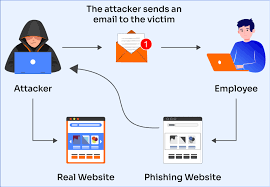
Keeping your business email safe from spam and phishing attacks is a real challenge these days. Hackers use tricky social engineering, fake login pages and malicious attachments to steal data or money. If you want to protect your business email from spam and phishing attacks, you need more than just a good spam filter.Start by setting up strong authentication methods, like two-factor authentication and robust passwords. Train your team so they can spot phishing emails by looking for suspicious links or odd requests. Use email security solutions that scan attachments and block known threats before they reach your inbox.Make sure your software is always updated and that you back up important emails. Combining these strategies, you can keep your business data secure and avoid falling victim to email scams or ransomware. Knowing how to protect your business email from spam and phishing attacks is essential for every modern business.
Understanding the dangers of business email spam and phishing attacks
Business email remains a primary target for cybercriminals worldwide. As organizations rely on platforms like Microsoft 365, Gmail for Business, and other enterprise solutions, attackers have become increasingly sophisticated in exploiting email vulnerabilities. Spam and phishing attacks can lead to data breaches, financial loss, and damaged reputations. Phishing, in particular, is a type of social engineering where threat actors impersonate trusted entities, such as financial institutions, cloud service providers, or internal staff, to trick users into revealing sensitive information.
- Data theft: Cybercriminals aim to steal login credentials, banking information, and intellectual property
- Malware distribution: Emails can deliver ransomware, spyware, or trojans that infect your network
- Business email compromise: Attackers impersonate executives to defraud companies or manipulate payments
- Brand damage: Successful attacks can erode trust among clients and stakeholders
How spam and phishing attacks operate
Understanding how these attacks work helps you strengthen your defenses. Spammers often harvest email addresses from publicly available sources or through data leaks. Using botnets and automation, they distribute mass emails that bypass basic filters. Phishing emails might include urgent requests, malicious attachments, or links to spoofed websites. Modern attacks often leverage protocols like SMTP and advanced evasion tactics to avoid detection by traditional spam filters.
- Spear phishing: Highly targeted campaigns aimed at specific employees or departments
- Clone phishing: Replicates legitimate emails but substitutes malicious links or attachments
- Business email compromise (BEC): Attackers hijack or spoof legitimate business accounts for fraud
- Whaling: Targets high-profile individuals such as CEOs or CFOs
Essential tools and technologies for email protection
Leading tech companies and organizations such as Google, Cisco, and Barracuda Networks have developed robust tools to mitigate email threats. Essential security protocols like SPF (Sender Policy Framework), DKIM (DomainKeys Identified Mail), and DMARC (Domain-based Message Authentication Reporting and Conformance) authenticate emails, reduce spoofing, and ensure message integrity. Implementing secure email gateways, anti-spam appliances, and advanced threat protection tools further enhances your security posture.
- SPF, DKIM, and DMARC: Authenticate outgoing and incoming emails to block spoofing
- AI-driven spam filters: Machine learning detects emerging threats by analyzing email behavior patterns
- Sandboxing: Isolates and analyzes suspicious attachments or links in a safe environment
- End-to-end encryption: Solutions like S/MIME or PGP protect sensitive communications from interception
Practical steps to protect your business email from spam and phishing
Taking a multi-layered approach is key to effective email security. Begin by educating your employees with regular cybersecurity awareness training, focusing on phishing recognition and safe email practices. Employ reputable business email providers that support advanced security protocols and monitoring features. Utilize email authentication, strong passwords, and multi-factor authentication to fortify your accounts.
- Employee training: Regularly simulate phishing attacks and provide updated security guidance
- Email authentication: Enforce SPF, DKIM, and DMARC across all domains
- Multi-factor authentication (MFA): Adds an extra layer of protection beyond passwords
- Use a dedicated business email service: Solutions offering SSL encryption, daily backups, and anti-spam filtering
Choosing the best email security solution for your business
Not all email solutions offer the same level of security. Select a provider that prioritizes compliance with international standards such as GDPR, ISO 27001, and NIST guidelines. Look for features like encrypted storage, automated backups, robust spam filtering, and customizable mailbox rules. Flexamedia, for instance, provides secure business email with SSL, daily backup, IMAP access, unlimited mailboxes, and an online calendar, making it an ideal choice for organizations in the Netherlands and beyond.
- Encrypted email storage: Ensures all data remains secure at rest and in transit
- Granular spam and phishing controls: Tailor filters to your organization’s unique needs
- Scalable storage options: Choose between 5GB or 10GB SSD packages to fit your workflow
- Integrated productivity tools: Manage emails, contacts, and calendars in one secure environment
Advanced strategies for sustained email security
Email security is an ongoing process. Conduct regular audits to assess vulnerabilities and update your security policies in line with evolving threats. Monitor logs for unusual login attempts and deploy threat intelligence feeds to stay ahead of emerging scams. Automate incident response for suspicious emails and integrate your email system with security information and event management (SIEM) tools for centralized visibility.
- Regular vulnerability assessments: Identify and patch weak spots in your email infrastructure
- Threat intelligence integration: Receive real-time updates on the latest phishing tactics
- Incident response automation: Quickly quarantine suspicious emails before they reach users
- Continuous policy updates: Keep your defenses sharp against evolving attack vectors
For organizations ready to take their email security to the next level, we recommend learning more about zakelijk email beveiliging in Nederland at Flexamedia, where you benefit from free domain, unlimited emails, robust SSL protection, and flexible storage options. Discover how our solutions help you stay ahead of threats by visiting professioneel e-mail adres aanmaken and see how we can secure your communications with tailored, enterprise-grade technology.
FAQ: How to Protect Your Business Email from Spam and Phishing Attacks
1. How can you identify a phishing email before clicking anything?
Always double-check the sender’s address—phishers often use emails that look similar to real ones but have subtle differences. Look out for urgent language like “your account will be closed” or “update your password now.” Hover over links (without clicking!) to preview the actual URL. If something feels off, trust your gut and verify with your IT team or the supposed sender using a different channel. Many Flexamedia clients avoid disaster simply by taking that extra moment to pause and check.
2. What are the best spam filtering tools for business email?
Effective spam filters are your first line of defense. At Flexamedia, our robust spam filters sift out suspicious messages before they hit your inbox. Look for tools that update regularly to tackle new threats, integrate with your existing mail platform (like IMAP/POP), and allow customization. Don’t forget to fine-tune your spam filter settings—no tool is truly set-and-forget.
3. Why should you use SSL for email security?
SSL (Secure Sockets Layer) encrypts your emails during transmission, keeping sensitive business data safe from prying eyes. It’s like sending your mail in a locked box instead of a postcard. Flexamedia’s business email comes with SSL by default, so your messages are always shielded, even on public Wi-Fi or mobile networks.
4. How does employee training reduce email attacks?
Human error is the weak spot in most businesses. Regular, engaging training helps your team recognize threats and react smartly. Share real-life phishing examples, run occasional “phishing drills,” and make sure everyone knows where to report suspicious emails. Flexamedia partners often see a sharp drop in incidents after a single training session.
5. What backup strategies help recover from email attacks?
If an attack slips through, recent backups can save the day. Flexamedia’s 30-day backup system lets you restore lost or compromised emails with a click, minimizing downtime and stress. Always schedule automatic backups and test your restore process, so you’re ready for anything. A backup isn’t just insurance—it’s your business’s lifeline.