
Android Multi Tools Solution for Mobile Unlocking and FRP Bypass

When Your Phone Is Stuck With Frp Auth Errors Or Flashing Issues It Can Feel Really Frustrating—especially When You Just Want A Quick And Safe Fix. Many Users Search For Android Multi Tools After Trying Different Methods That Didn’t Work And Wasting Hours On Confusing Steps.
In This Post You’ll Learn How Android Multi Tools Helps With Mediatek And Spreadtrum Auth Frp Auth Demo Removal Secret Decrypt And Edl/brom Access For Brands Like Infinix Tecno Itel Oppo Realme Vivo Nokia And Xiaomi. We’ll Explain What Each Auth Option Does And How It Can Solve Common Repair Problems So You Can Move Forward With Confidence And Fix Your Device The Right Way.
Android Multi Tools Solution For Mobile Unlocking And Frp Bypass
Mobile Repair Can Get Stressful When A Phone Is Locked Stuck On Frp Or Showing Strange Auth Errors. You Try Different Tools Watch Tutorials And Still Feel Confused Because Nothing Seems To Work The Right Way. That’s Why Many Technicians And Users Turn To Android Multi Tools When They Want One Simple Solution For Many Problems.
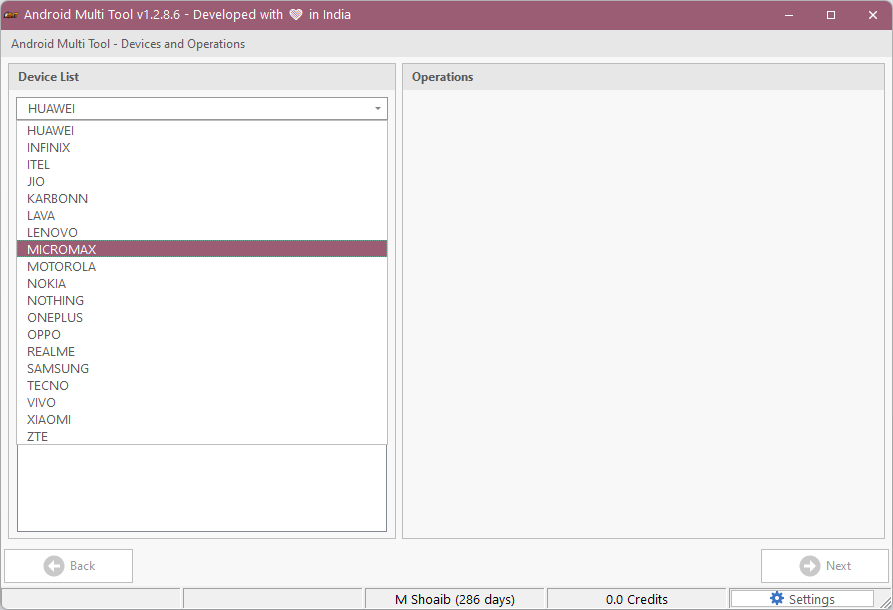
This Tool Supports Multiple Brands And Chipsets So You Don’t Have To Switch Between Different Software Again And Again. Whether The Issue Is Flashing Demo Lock Or Security Protection It Gives You Practical Options That Actually Help You Move Forward.
Infinix / Tecno / Itel Mediatek Auth
Many Transsion Devices Use Mediatek Processors And Block Flashing Without Proper Authorization. This Feature Allows Safe Access So You Can Perform Tasks Like Frp Reset Firmware Flashing And System Repair.
It Is Useful When The Phone Is Stuck On Setup Or Not Responding To Normal Reset Methods. With This Option Repair Work Becomes Smoother And Less Risky.
Infinix / Tecno / Itel Spreadtrum Auth
Spreadtrum-based Phones Often Show Connection Or Permission Errors During Repair. This Auth Option Helps Establish A Secure Link Between The Tool And The Device.
It Is Helpful For Fixing Dead Phones Boot Issues And Blocked Flashing Processes. Once Authorized Basic Repair Tasks Work More Reliably.
Oppo / Oneplus / Realme Secracy Decrypt
Some Oppo Oneplus And Realme Models Store System Data In Encrypted Form. Without Decrypting It Flashing And Repair Tools May Fail Again And Again.
This Feature Unlocks That Protected Layer So Normal Repair Steps Can Continue. It Saves Time And Reduces Repeated Flashing Errors.
Oppo / Oneplus / Realme Demo Remove
Demo Phones Are Usually Locked In Store Display Mode And Cannot Be Used Like Normal Phones. This Option Helps Remove Demo Restrictions Safely.
After Using It You Can Sign In Install Apps And Use All Phone Features Normally. It Is Useful For Both Buyers And Repair Shops.
Oppo / Oneplus Mediatek Auth
Oppo And Oneplus Devices With Mediatek Chips Also Require Special Permission For Flashing. Without It Tools May Stop Or Fail During Repair.
This Feature Provides Stable Access To System Partitions. It Improves Success Rates When Fixing Software Issues.
Realme Mediatek Auth
Realme Mediatek Phones Come With Security Checks That Block Flashing And Frp Removal. This Option Helps Bypass Those Limits Safely.
It Is Helpful For Fixing Boot Loops System Crashes And Account Locks. Repair Becomes Faster And More Reliable.
Nokia Fastboot Hmd Auth
Nokia Phones Often Need Hmd Authorization In Fastboot Mode. Without It Even Simple Commands May Not Work.
This Option Enables Proper Fastboot Access For Flashing And Unlocking. It Helps Restore System Files Safely.
Vivo Qualcomm / Mediatek Auth
Vivo Uses Both Qualcomm And Mediatek Processors And Both Need Secure Access For Repairs. This Feature Supports Both Chip Types.
It Helps When Phones Are Locked Stuck Or Not Accepting Factory Reset. Once Authorized Many Blocked Functions Become Usable Again.
Xiaomi Edl / Brom Auth
Xiaomi Devices Often Require Deep-level Access Using Edl Or Brom Mode. These Modes Are Usually Protected By Security Layers.
This Option Allows Safe Entry Into Low-level Flashing Modes. It Is Useful When Phones Are Completely Dead Or Badly Corrupted.
Xiaomi Fastboot To Edl Auth
Sometimes Fastboot Works But Edl Mode Is Blocked By Security. This Feature Helps Switch From Fastboot To Edl Safely.
It Allows Full Firmware Flashing Without Opening The Phone. That Reduces Hardware Risk And Saves Time.
Xiaomi Mi Assistant Frp Auth
Some Xiaomi Phones Block Frp Reset Even In Recovery Mode. This Auth Option Works Through Mi Assistant Mode.
It Helps Remove Google Account Lock After Factory Reset. Users Can Regain Access To Their Phones Without Complex Methods.
Transsion Anti Crack Fix Auth
Transsion Devices May Show Anti-crack Protection Errors After Wrong Flashing. This Can Stop The Phone From Booting At All.
This Feature Helps Fix That Protection And Restore Normal Startup. It Can Save Devices That Seem Completely Dead.
How To Download Gsm Atoz Tool Easily And Safely
When Your Phone Is Locked Or Stuck With A Software Problem You Just Want One Simple Tool That Actually Helps. That’s Why Many People Look For Gsm Atoz Tool But Then They Get Confused By So Many Links Ads And Fake Pages That Waste Their Time.
To Download Gsm Atoz Tool Open Your Browser And Search The Tool Name With “latest Version Download.” Open A Website That Shows Proper Details And Screenshots Of Gsm Atoz Tool Then Click The Main Download Button And Wait Until The File Is Fully Downloaded.
After The Download Turn Off Antivirus For A Few Minutes Because Repair Tools Like Gsm Atoz Tool Are Sometimes Blocked By Mistake. Extract The Zip File Install The Drivers Inside The Folder And Restart Your Computer So Everything Loads Correctly.
Now Right-click On Gsm Atoz Tool And Choose “run As Administrator.” Once It Opens You Can Connect Your Phone And Start Fixing Problems Without Errors Or Connection Issues.
Why Android Multi Tools Is Useful For Repair Work
Instead Of Using Many Different Programs This Tool Combines Multiple Repair Functions In One Place. It Saves System Space And Reduces Confusion During Work.
For Beginners It Also Makes Learning Easier Because Features Are Clearly Organized. You Choose The Function And Follow Simple Steps.
Final Thoughts
Phone Repair Becomes Frustrating When Security Blocks Every Solution You Try. Tools Like Android Multi Tools Make Those Problems Easier By Giving Safe Access To Protected Systems.
If You Deal With Multiple Brands This Tool Can Become Part Of Your Daily Repair Setup. It Keeps Your Work Faster Safer And More Successful.